I taught Claude how I sound four months ago. Five samples, one prompt, one file. It still makes the same three mistakes, every single time I draft a new article with it.
That file is the reason brisk. sounds like me at all, built on a tool stack that costs 17 euros a month. It also hasn't changed once since April. I keep fixing the same things. Claude keeps forgetting I fixed them.
I built and tested what's below on this exact article, before I decided it was worth publishing.
What This Covers
- Why a voice file freezes the day you write it
- The one piece I stole from Alex Lieberman's Content Machine, and cut down to size
- The actual Skill, free to download
- What happened when I ran it on this article, the real patterns it found
- Where it still needs me, not Claude
This one runs long. It comes with a file.
Why Does a Claude Voice File Stop Working Over Time?
Open my last five drafts and you'll find the same three fixes.
I cut a hedge word Claude loves. I shorten the opening paragraph. I add a real number where Claude wrote a vague claim.
I thought my voice file solved this. It solved something else.
Imagine your voice file like a photo. It's right, once, in that moment you took it.
It tells Claude how I sound. It says nothing about what I personally keep correcting, draft after draft.
The rule: a voice file teaches tone. It has no memory of the mistakes you keep making. Do this: open your last three drafts and highlight everything you changed. The same fix twice isn't an edit. It's a lesson your system should already know.
Where Did the Correction-Lessons Idea Come From?
Wyndo, who writes The AI Maker, rebuilt something Alex Lieberman showed on How I AI. Lieberman co-founded Morning Brew and runs Tenex now.
His system runs in four stages.
- An interview that won't stop until you give it real stories
- A draft that only pulls from that transcript
- Five reviewers checking structure, hook, craft, slop, and reader value
- A step that compares your draft to your edit and saves the pattern
Four stages is a company's tool, not mine. I don't need five reviewers. I already write my own first draft, every single time.
I only wanted the last piece: the one that watches what I fix and remembers it.
The rule: steal one piece, not the machine. You don't need five reviewers to fix a voice file that never updates.
How Does the Correction-Lessons Skill Actually Work?
Here's the whole thing, in plain English.
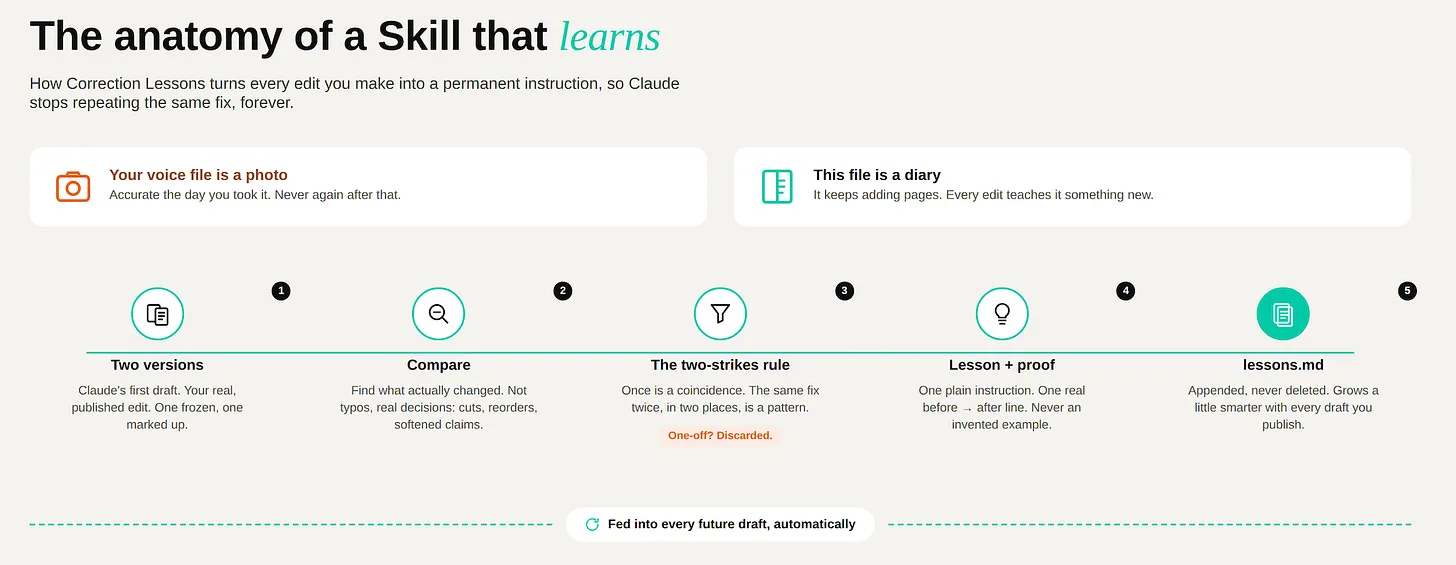
Your voice file is a photo. It's right, once.
This is a diary. It keeps adding pages.
I built one Skill called correction-lessons. It needs three files: the draft Claude wrote, the version I actually published, and a running file called lessons.md that starts empty.
Here's what it does, step by step:
- A. It reads both versions and finds what actually changed. Not typos. Decisions: a cut sentence, a softened claim, a reordered section, a hedge word removed.
- B. It ignores anything that only happened once. A pattern needs to repeat before it counts as a lesson.
- C. For every real pattern, it writes one plain instruction, and attaches the real before-and-after line as proof. Never an invented example.
- D. It adds new lessons to
lessons.mdunder that day's date. It never deletes the old ones. If a new lesson fights with an old one, it flags the conflict instead of quietly picking a winner.
That's it. No interview panel. No five reviewers.
One file that gets slightly smarter every time you run it, forever.
The rule: a one-off correction is not a lesson. The same correction twice is.
What Happened When I Ran It on This Article?
I ran the Skill on this exact article's draft-to-final diff, and on a second recent draft alongside it. Three real patterns held up.
Lesson 1: don't assume the reader's schedule matches yours. Claude kept writing day-specific references like "every single Monday," assuming whoever reads the piece edits on the same day I do. I generalized it in two places.
Proof: "every single Monday" → "every single time I draft a new article with it"
Lesson 2: introduce metaphors as an invitation, not a flat declaration. Claude wrote "X is Y" as stated fact. I softened it to "imagine X like Y" or "X is more like Y," across two instances.
Proof: "Your voice file is a photo. It's right, once." → "Imagine your voice file like a photo. It's right, once, in that moment you took it."
Lesson 3: keep the AI-agent framing explicit. Claude flattened "agent reviewers" down to a generic "reviewers." I added "agent" back in twice.
Proof: "Five reviewers checking..." → "Five agent reviewers checking..."
The Skill also correctly threw out a near-miss: a softened number, changed once. One edit decision touching one line isn't a repeated pattern, so it didn't count it as a lesson. That line matters as much as the three above it. A Skill that logs every single edit as a "lesson" is useless within a month, the file fills with noise and you stop trusting it. The two-strikes rule is what keeps it honest.
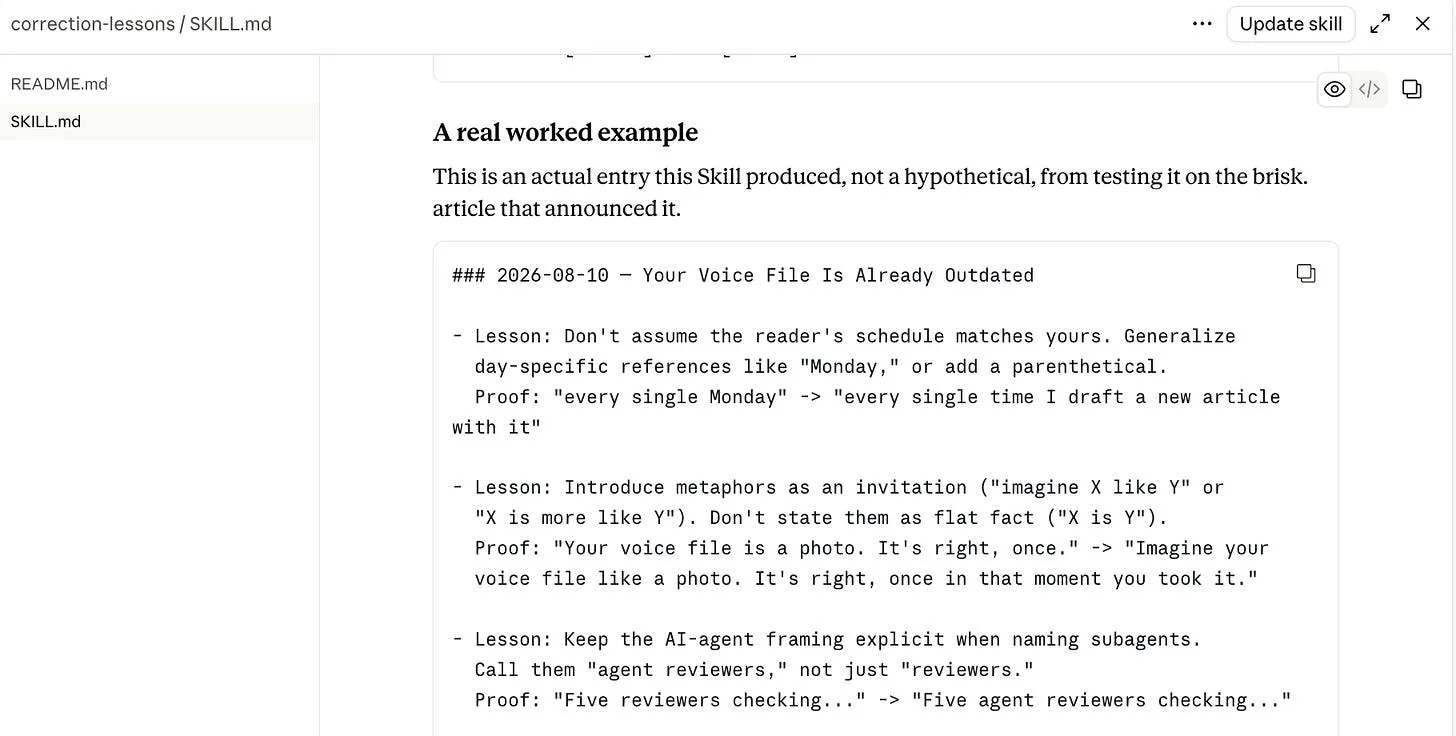
The actual worked example, straight from the Skill file.
Where Does This Skill Still Need You, Not Claude?
This Skill has no opinion until you feed it two real versions of the same piece. Run it once and it finds nothing, because one edit pass isn't a pattern yet.
It also can't rescue a draft with no material. If there's no real story, no number, no opinion I've actually worked out, there's nothing for it to learn from. That problem sits upstream of this fix, not inside it.
And when two lessons disagree, it doesn't decide. I do. That's on purpose.
How Do You Build Your Own Correction-Lessons Skill?
Grab the free Skill file below, upload it once in Claude, and keep three things: the original draft, your real final edit, and a running lessons file.
Download the correction-lessons Skill →
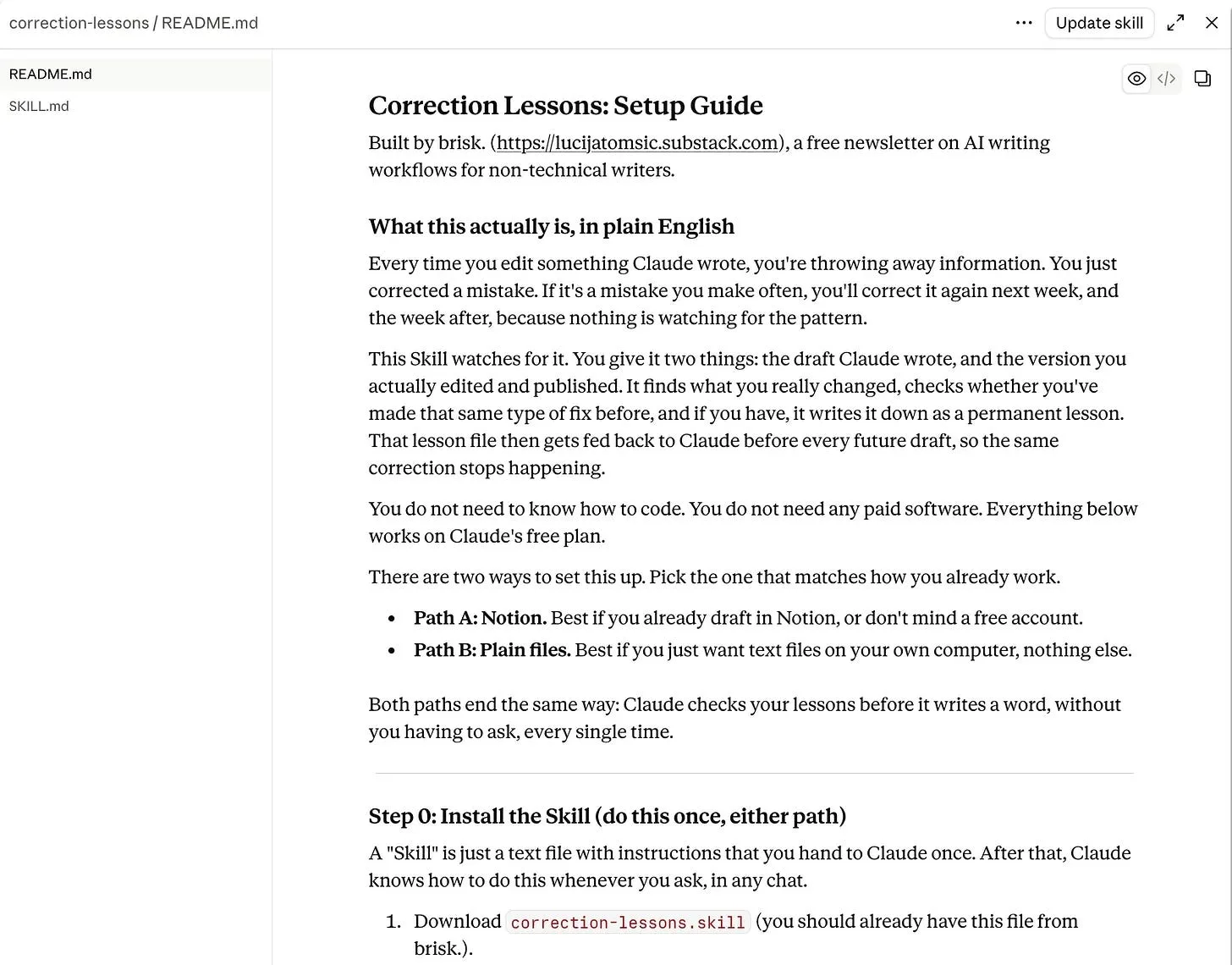
Step 0, install it once: in Claude, open Settings, turn on "Code execution and file creation" under Capabilities if it isn't already, then find Skills, click "+", "Create skill," and upload the file. Make sure the toggle next to it is on. It's now available in every chat on your account.
Then pick whichever setup matches how you already work:
- Notion. Create one page with three sub-pages: Draft (original, never edited), Final (edit here), and Lessons (starts empty). Connect Notion to Claude once under Settings > Connectors. After your real edit pass, tell Claude: "Compare Draft and Final in my Correction Lessons Notion page, and update Lessons using the correction-lessons skill."
- Plain files. One folder, three files:
draft.md,final.md,lessons.md(starts empty). After your real edit pass, uploaddraft.mdandfinal.mdin a chat and ask Claude to "Run the correction-lessons skill on these two files." Copy the confirmed lessons intolessons.md.
Either path ends the same way: open (or create) a Claude Project for your drafts, add a custom instruction telling it to check your lessons file first, and upload lessons.md (or connect the Notion page) to that Project. From then on, every chat inside it checks your lessons automatically, no re-explaining required.
Nothing shows up on your first run. That's normal, a lesson needs the same type of correction to appear twice before it counts. Keep going. The second or third run is usually where the real ones start appearing.
Closing
My voice file still says I write calm, direct sentences. It has no idea I've cut the phrase "to be honest" out of four drafts in a row.
Now it will.
Open your last edited draft tonight. Find the pattern you keep fixing. Feed it back in.
If you found this useful, I send one like it every week.
Subscribe free → - Lucija Tomšić · brisk.vision